
Table of Contents
When you’re planning to upgrade your home entertainment system with a 65 inch television, understanding the exact dimensions becomes crucial.
Whether you’re redesigning your living room, mounting it on a wall, or selecting the perfect TV stand, knowing precisely how wide is a 65 inch TV is will save you from costly mistakes and buyer’s remorse.
Quick Answer Box
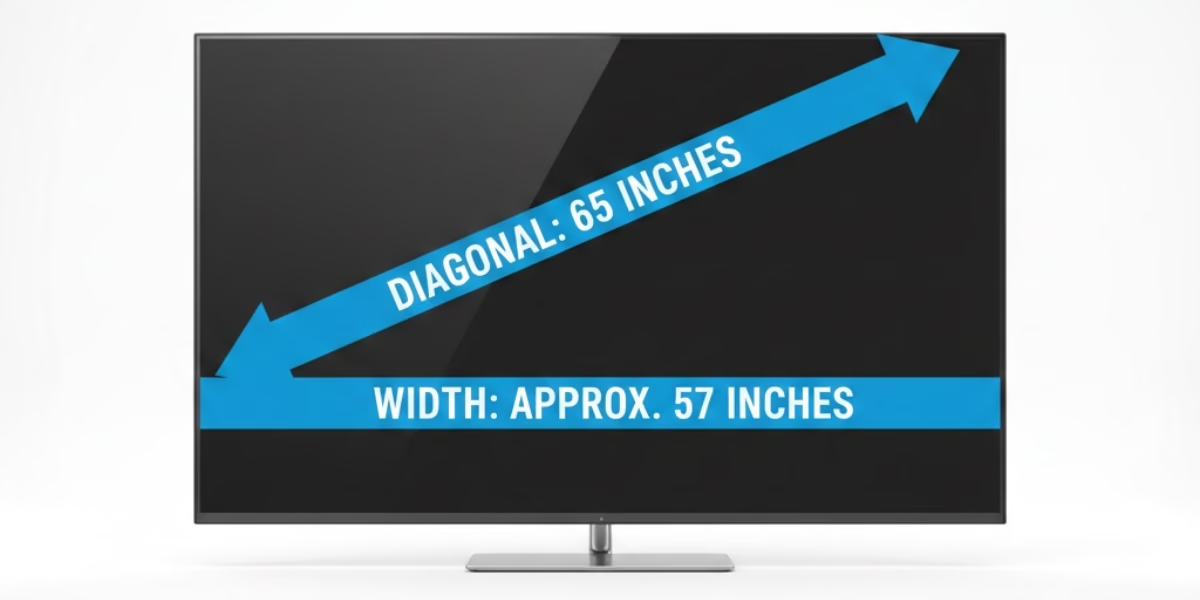
A 65-inch TV is approximately 57 inches wide. To avoid overhang and maintain proper balance, your TV stand should be at least 62-65 inches wide. The 65″ measurement refers to the diagonal screen size, not the actual width.
Quick Comparison: 65″ TV Models by Width
| TV Model Type | Average Width | Recommended Stand Width |
| Slim Bezel (OLED) | 56.9″ | 62″ or wider |
| Standard LED | 57.2″ | 65″ or wider |
| Rugged/Outdoor | 58.0″ | 66″ or wider |
Understanding TV Screen Measurements: Why 65 Inches Isn’t the Width
Before we dive into the specifics, let’s clarify a common misconception that trips up many buyers. When manufacturers label a television as “65 inches,” they’re referring to the diagonal measurement of the screen from one corner to the opposite corner. This is an industry standard that dates back to the era of cathode ray tubes and remains in use today.
The actual width of a 65 inch TV is approximately 56.7 inches, not 65 inches. This diagonal measurement system can be confusing, especially when you’re trying to visualize whether a TV will fit in your designated space.
Breaking Down the Standard Dimensions
For a typical 65 inch TV with the modern 16:9 aspect ratio, here are the standard screen dimensions:
- Width (Screen Only): 56.7 inches
- Height (Screen Only): 31.9 inches
- Diagonal: 65 inches
However, these measurements represent only the visible screen area. The actual television unit will be slightly larger once you account for the bezel (the frame surrounding the screen) and the stand.
Complete TV Unit Dimensions
When planning your space, you need to consider the total dimensions:
Without Stand:
- Width: 57-58 inches
- Height: 32-34 inches
- Depth: 2-4 inches
With Stand:
- Width: 57-58 inches
- Height: 34-36 inches
- Depth: 10-14 inches
These dimensions can vary by 1-2 inches depending on the manufacturer and model. Modern televisions with slim bezels will be closer to the lower end of these ranges, while older models or those with thicker frames may be slightly larger.
Why 65 Inches Has Become the Sweet Spot in 2026
The popularity of 65 inch televisions has skyrocketed in recent years, and there are compelling reasons why this size has become the preferred choice for most households.
The Perfect Balance
A 65 inch TV strikes an ideal balance between
- Immersive Viewing: Large enough to create a cinema-like experience at home without overwhelming your space
- Affordability: Significantly more budget-friendly than 75+ inch models while still delivering premium picture quality
- 4K Optimization: At this size, the benefits of 4K resolution become clearly noticeable from typical viewing distances
- Room Compatibility: Fits comfortably in average-sized living rooms, bedrooms, and entertainment spaces
Market Evolution
In 2026, 65 inch TVs represent approximately 35% of all television sales globally. Prices have dropped dramatically; quality 4K models now start around $350-$450 during major sales events like Black Friday and Labor Day, making this premium size accessible to more consumers. The improvement in panel technology means even entry-level 65 inch TVs deliver stunning picture quality that would have cost thousands just five years ago.
Calculating Your Ideal Viewing Distance
One of the most overlooked aspects of TV sizing is the optimal viewing distance. Sitting too close can cause eye strain and make you notice individual pixels, while sitting too far reduces the immersive experience.
The Scientific Approach
Industry standards from organizations like THX and SMPTE recommend specific viewing angles for the best experience:
For 4K TVs (Recommended):
- Minimum Distance: 5.4 feet
- Optimal Distance: 6.5-8.5 feet
- Maximum Distance: 13 feet
For HD TVs:
- Recommended Distance: 8-13 feet
The Simple Calculation Method
Here’s an easy formula to calculate your ideal viewing distance:
Screen Size × 1.2 = Optimal Distance (in inches)
For a 65 inch TV: 65 × 1.2 = 78 inches (6.5 feet)
This calculation positions your screen within the recommended 40-degree field of view, creating an immersive cinema experience without overwhelming your visual field.
Room Size Requirements
Your room should accommodate both the TV and the viewing distance comfortably:
- Small Rooms (10×10 feet): May feel cramped with 65 inches; consider mounting options
- Medium Rooms (12×15 feet): Perfect for 65 inch TVs with flexible seating arrangements
- Large Rooms (15×20+ feet): 65 inch works well, or consider 75+ inches for better visibility
How to Measure Your Alcove or Cabinet Space
Many American homes feature built-in entertainment centers or alcoves. Follow these steps to measure correctly:
- Width Measurement: Measure the inside width at three points (top, middle, bottom) and use the smallest measurement
- Depth Check: Measure from the back wall to the front edge. Add at least 2 inches on each side for proper ventilation
- Height Clearance: Account for at least 3 inches above the TV for air circulation
- Cable Access: Check if there’s a channel or opening behind the alcove for power and HDMI cables
Pro Tip: The TV should be at least 1 inch narrower than your alcove width to allow for easy installation and removal.
The Art of TV Mounting: Height Matters
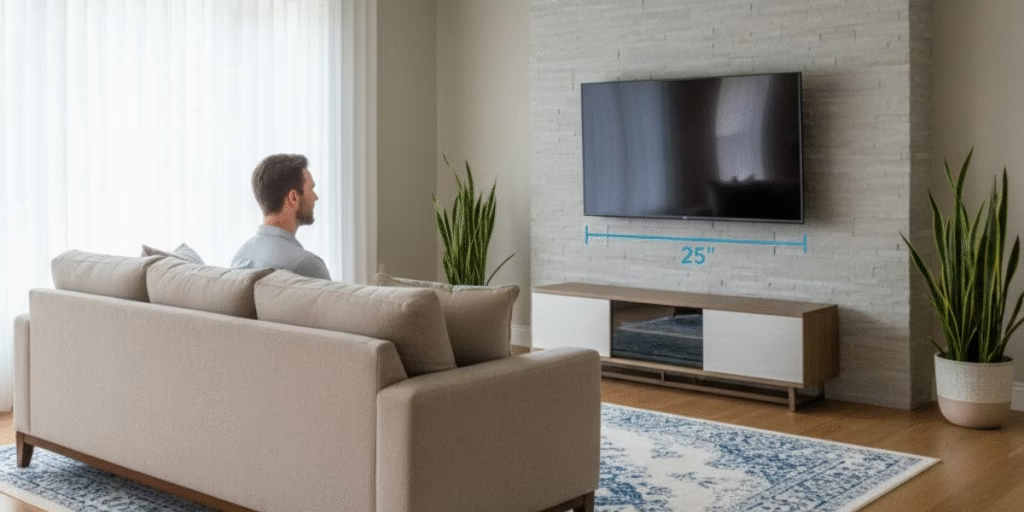
Knowing how wide a 65 inch TV is only solves half the puzzle. Mounting height is equally crucial for comfort and viewing quality.
The Golden Rule of Mounting Height
Center of screen at eye level when seated = 42-45 inches from floor
For a 65 inch TV with a screen height of approximately 32 inches:
- Bottom edge should be 25-30 inches from the floor
This positions the TV’s center at the optimal eye level for most adults sitting on standard couches (with a seat height of 18-20 inches).
Step-by-Step Height Calculation
- Measure your seated eye level from the floor (typically 40-42 inches)
- Measure your TV’s height (approximately 32 inches for 65″ models)
- Divide TV height by 2 (32 ÷ 2 = 16 inches)
- Subtract from eye level (42 – 16 = 26 inches from floor to bottom edge)
Special Mounting Scenarios
Above a Fireplace:
- Mount 4-12 inches above the mantel
- Use a tilting mount to angle the screen downward
- Consider heat exposure with wood-burning fireplaces
- Maximum recommended height: Bottom edge no higher than 48 inches from the floor
Bedroom Mounting:
- Account for the lying-down position
- Center at 45-50 inches for optimal viewing from bed
- Consider articulating mounts for angle adjustments
High-Ceiling Rooms:
- Maintain the 42-45 inch center rule regardless of ceiling height
- Resist the temptation to mount higher just because there’s wall space
Pre-Installation Checklist
Before you start mounting your 65″ TV, gather these tools and materials:
Tools Needed:
- Stud finder (critical for safe mounting)
- Power drill with bits
- Level (24-inch recommended)
- Phillips screwdriver
- Tape measure
- Pencil for marking
Materials Required:
- Wall mount (VESA compatible)
- Lag bolts or wood screws (usually included with the mount)
- Safety anchors or furniture straps
- HDMI cables (HDMI 2.1 recommended)
- Cable management kit (optional but recommended)
Safety Check:
- Locate at least two wall studs (16 inches apart in most US homes)
- Verify the wall can support 100+ pounds
- Check for electrical wiring or plumbing behind the wall
TV Stand Selection: Width Isn’t Everything
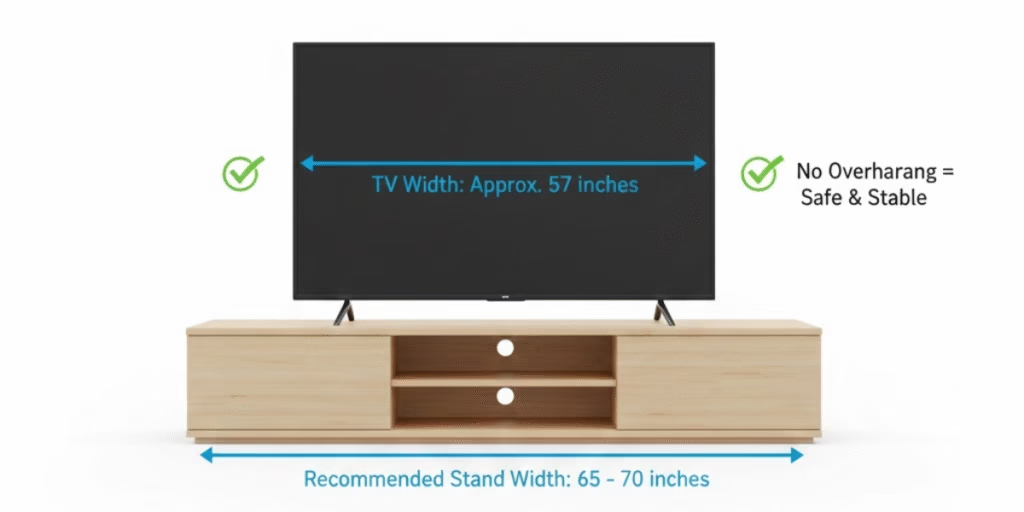
If wall mounting isn’t your preference, choosing the right TV stand is critical for both aesthetics and safety.
The Width Rule
Your TV stand should be at least 4-6 inches wider than your TV.
For a 65 inch TV (57 inches wide):
- Minimum stand width: 61-63 inches
- Recommended width: 65-70 inches
- Premium balanced look: 70+ inches
Beyond Width: Other Stand Considerations
Height Requirements:
- Ideal stand height: 24-30 inches
- Places a 65″ TV at 40-45 inches when combined
- Allows comfortable viewing from standard seating
Depth Considerations:
- Minimum depth: 16-18 inches for stability
- Prevents top-heavy appearance and tipping hazards
- Allows space for soundbars and center speakers
Weight Capacity:
- Most 65 inch TVs weigh 50-70 pounds
- Choose stands rated for at least 100 pounds
- Consider the additional weight of soundbars and accessories
Safety First
With a 65 inch TV, stability is paramount:
- Use safety anchors or furniture straps even with proper stand sizing
- Make sure the stand’s feet are wider than the TV base
- Avoid placing near high-traffic areas where it could be bumped
- Keep away from edges if you have children or pets
Room Planning: Making Space Work for You
Understanding how wide a 65 inch TV is helps you plan your entire room layout effectively.
The 5-Zone Room Setup
Zone 1: TV Wall (57-58 inches wide minimum)
- Leave 6-12 inches of clearance on each side
- Total wall space needed: 70-82 inches
- Account for speaker placement
- Consider cable management solutions
Zone 2: Viewing Area (6.5-8.5 feet away)
- Primary seating positioned for optimal viewing angle
- Center seats should face the TV directly
- Side seating within a 30-degree viewing angle
Zone 3: Equipment Zone
- Space for gaming consoles, cable boxes, streaming devices
- Proper ventilation requirements (4-6 inches clearance)
- Cable management consideration
Zone 4: Circulation Space
- Maintain 3-foot walkways around furniture
- Prevent blocking the TV view during movement
- Consider door swing paths
Zone 5: Ambient Lighting
- Position away from direct windows when possible
- Use curtains or blinds for glare control
- Plan lamp placement to avoid screen reflections
Furniture Arrangement Tips
L-Shaped Rooms:
- Position the TV on the shorter wall
- Arrange seating in the viewing zone
- Use corner mounting for flexibility
Long Narrow Rooms:
- Mount the TV on the short wall
- Create a viewing zone in the middle section
- Use furniture to define spaces
Open Concept Spaces:
- Consider room dividers
- Use area rugs to define the viewing zone
- Swivel mounts for multi-angle viewing
Technical Specifications Beyond Physical Size
When shopping for a 65 inch TV, physical dimensions are just the starting point. Several other specifications impact your setup.
Weight Considerations
Average Weights:
- LED/LCD TVs: 45-55 pounds without stand
- OLED TVs: 55-70 pounds without stand
- Withstand: Add 5-10 pounds
Why Weight Matters:
- Wall mount selection and rating
- Stud requirements for mounting
- Two-person installation necessity
- Furniture weight capacity
VESA Mounting Pattern
VESA (Video Electronics Standards Association) standardizes mounting hole patterns:
Common 65″ TV VESA Sizes:
- 400×400 mm (most common)
- 400×300 mm
- 600×400 mm
Before Buying a Mount:
- Measure your TV’s back mounting holes
- Match the mount’s VESA pattern exactly
- Verify the weight rating exceeds the TV weight
Depth Considerations for Different Technologies
LED/LCD TVs: 2-3 inches deep
- Traditional backlighting
- Slightly more protrusion from the wall
- Better value for budget-conscious buyers
OLED TVs: 1.5-2.5 inches deep
- Thinner profile
- Sleeker wall-mounted appearance
- Premium pricing
QLED TVs: 2-3.5 inches deep
- Quantum dot technology
- Similar depth to LED
- Brighter than OLED in lit rooms
Brand-Specific Dimension Variations
While most 65 inch TVs follow similar sizing, there are subtle differences between manufacturers worth noting.
Samsung 65 Inch TVs
Typical Dimensions:
- Width: 57.0-57.2 inches
- Height: 32.7-32.9 inches
- Depth: 1.6-2.4 inches (without stand)
Notable Features:
- Ultra-slim bezels on premium models
- One Connect box (S95 series) for cleaner cable management
- Heavier than average OLEDs
LG 65 Inch TVs
Typical Dimensions:
- Width: 56.9-57.1 inches
- Height: 32.7-33.1 inches
- Depth: 1.8-2.2 inches (without stand)
Notable Features:
- Gallery design options for flush wall mounting
- Lightweight OLED panels
- Minimal bezel design
Sony 65 Inch TVs
Typical Dimensions:
- Width: 57.0-57.3 inches
- Height: 32.9-33.2 inches
- Depth: 2.2-2.8 inches (without stand)
Notable Features:
- Acoustic surface audio in some models
- Slightly deeper profile
- Robust build quality
Budget Brand Variations (TCL, Hisense)
Typical Dimensions:
- Width: 57.2-57.5 inches
- Height: 33.0-33.5 inches
- Depth: 2.5-3.5 inches
Notable Characteristics:
- Slightly thicker bezels
- More variation in stand designs
- Excellent value proposition
Transportation and Delivery Logistics
Understanding how wide a 65 inch TV is becomes critical when planning transportation.
Box Dimensions
Packaged 65 inch TVs typically measure:
- Width: 62-65 inches
- Height: 38-41 inches
- Depth: 7-9 inches
- Weight: 60-85 pounds
Vehicle Requirements
Sedans: Generally won’t fit, even with seats folded
SUVs/Crossovers: Most accommodate 65″ TVs diagonally with seats folded
Minivans: Excellent option with a flat cargo area
Pickup Trucks: Ideal, but protect from the weather
Professional Tip: Measure your vehicle cargo area diagonally before purchase. Most major retailers like Best Buy, Walmart, and Amazon offer affordable delivery services worth considering.
Unboxing and Setup
Space Requirements:
- Clear an area of 8×6 feet minimum
- Two people for safe handling
- Soft surface for laying the box flat
- Tools: Phillips screwdriver, level, stud finder
Safety Protocols:
- Never transport a TV standing up
- Always keep upright during setup
- Allow 2-4 hours after transport before powering on
- Inspect for damage before removing packaging
Future-Proofing Your 65 Inch TV Purchase
In 2026, consider these factors to make sure your investment remains relevant:
Resolution Standards
4K (Current Standard):
- 3840 × 2160 pixels
- Perfect for 65 inch viewing
- Abundant content availability
8K (Emerging):
- 7680 × 4320 pixels
- Limited content currently
- Noticeable benefits at 65″ from close distances
- Price premium decreasing
Connectivity Requirements
Required Ports:
- HDMI 2.1 (4 ports minimum)
- 120 Hz refresh rate support
- eARC for audio equipment
- Multiple USB ports
Smart Features:
- Built-in streaming apps
- Voice control compatibility
- Regular software updates
- Smart home integration
Panel Technology Evolution
Current Options:
- OLED: Perfect blacks, wide viewing angles, premium pricing
- QLED: Bright displays, good for lit rooms, mid-to-high pricing
- Mini-LED: Excellent contrast, improving rapidly, competitive pricing
2026 Trends:
- Micro-LED entering the consumer market
- QD-OLED combines the best of both worlds
- Improved HDR implementation across all tiers
Common Mistakes to Avoid
Measurement Errors
Mistake: Measuring only the wall width
Solution: Account for a minimum 6-inch clearance on each side
Mistake: Forgetting about depth.
Solution: Measure from the wall, including any molding or baseboards
Mistake: Ignoring cable management needs
Solution: Plan for additional space behind the TV for connections
Viewing Distance Miscalculations
Mistake: Assuming “bigger is always better.”
Solution: Use the viewing distance formula; 65″ is too large for rooms under 10×10 feet
Mistake: Not considering the room shape.
Solution: Long, narrow rooms need different planning than square rooms
Mounting Height Errors
Mistake: Mounting too high (especially over fireplaces).
Solution: Prioritize viewing comfort over aesthetic placement
Mistake: Not accounting for furniture height
Solution: Measure from the actual seated position, not the floor
Cost Breakdown: What to Expect in 2026
Understanding the full cost of 65 inch TV ownership helps budget effectively:
TV Purchase Prices
Budget Range ($350-$700):
- TCL, Hisense entry models
- Basic 4K, Hz refresh
- Limited HDR
Mid-Range ($700-$1,500):
- Samsung QLED, LG NanoCell
- Full 4K HDR
- 120 Hz gaming features
Premium ($1,500-$3,000):
- OLED panels
- Advanced processing
- Premium build quality
Ultra-Premium ($3,000+):
- Latest technology
- 8K resolution options
- Professional calibration
Additional Costs
Wall Mounting:
- Professional installation: $150-$350
- Quality mount: $50-$200
- In-wall cable management: $100-$300
TV Stand:
- Basic: $100-$200
- Mid-range: $200-$500
- Premium: $500-$1,500+
Accessories:
- HDMI 2.1 cables: $20-$50 each
- Surge protector: $30-$100
- Streaming devices: $30-$180
- Soundbar: $200-$1,000+
Current Market Pricing
Major retailers like Best Buy, Amazon, and Walmart frequently run sales on 65″ TVs. Watch for these key shopping periods:
- Black Friday/Cyber Monday: Deepest discounts (30-50% off)
- Labor Day Weekend: Strong mid-year deals
- Super Bowl Season (January-February): TV-focused promotions
- Prime Day (July): Amazon-exclusive deals
Conclusion
Now you know that a 65-inch TV is approximately 57 inches wide, but the journey to finding your perfect television extends far beyond this single measurement. By understanding the complete dimensional picture, including height, depth, viewing distance requirements, and room integration, you’re equipped to make a confident purchase decision.
A 65 inch TV represents the optimal sweet spot for most modern homes, offering cinema-quality entertainment without overwhelming your space or budget. Whether you choose wall mounting or a stand, OLED or QLED, premium or budget-friendly, the key to satisfaction lies in proper planning.
The perfect 65-inch TV is out there waiting for you, and with this comprehensive guide, you’re now fully prepared to find it, install it correctly, and enjoy years of exceptional entertainment.
FAQs
Q: Can a 65-inch TV fit through a standard doorway?
A: Yes, when boxed. Standard US doorways are 32-36 inches wide, and you can angle a 65″ TV box (62-65″ wide) diagonally. Remove the door if needed.
Q: How much does a 65 inch TV weigh?
A: Most range from 45-70 pounds without a stand, with OLED models typically heavier than LED. Always check specific model specifications.
Q: Is 65 inches too big for a bedroom?
A: It depends on your room size and viewing distance. For bedrooms 12×12 feet or larger with an 8+ foot viewing distance, 65 inches works well.
Q: What’s the difference between measured TV width and advertised size?
A: The 65″ refers to the diagonal screen measurement. Actual width is approximately 57 inches. This universal measurement standard applies to all TVs.
Q: Can I mount a 65 inch TV on drywall?
A: Only with proper stud mounting. Drywall alone cannot support 50+ pounds safely. Always mount into wall studs or use blocking for safety. Use a stud finder to locate studs before drilling.
One thought on “How Wide Is a 65 Inch TV: Complete Dimension & Setup Guide (2026)”